

ChatGPT is good at suggesting keywords, grouping them by intent and drafting briefs, but it has no search volume data of its own. A volume it writes from memory is a guess, and its web search mostly finds other people's old numbers. To do keyword research with real search volume, connect a keyword data tool to ChatGPT as a custom MCP server, then ask ChatGPT to call that tool for exact phrases in one country.
This guide uses Cite42, a pay-per-call API and MCP server for real keyword search volume, with no subscription. If you already pay for Keywords Everywhere, Semrush or Ahrefs, their MCP servers can fill the same role, and the rest of the workflow stays the same.
Cite42 publishes this guide. The keyword results are real Cite42 requests from October 5, 2026, and you can download the inputs and responses. The ChatGPT connection steps follow OpenAI's documentation as of October 6, 2026.
The workflow in six steps
- Connect a keyword data tool to ChatGPT.
- Ask for keyword suggestions, labeled as suggestions.
- Check the shortlist's search volume in one batch.
- Read CPC and competition for what they measure.
- Expand the best seed into related keyword ideas.
- Handle missing data, then choose the pages to write.
Step 1: Connect Cite42 to ChatGPT
OpenAI's custom MCP server guide, which replaced its developer mode guide, describes these steps for ChatGPT on the web:
- Go to ChatGPT Plugins, select the plus button, then Add custom MCP server.
- Enter
Cite42as the name. Under Connection, enterhttps://mcp.cite42.devas the Server URL. - Choose OAuth for authentication, review the risk warning and select I understand and want to continue.
- Select Create as a plugin, then install the new plugin from your personal plugins.
- Complete the Cite42 sign-in when ChatGPT opens it. Calls then bill to your Cite42 balance, and no API key goes into the chat.
- Start a new chat, type
@in the prompt box and select Cite42.
If Add custom MCP server is missing, turn on Developer mode under Settings, then Security and login. In a managed Business or Enterprise workspace, admin permissions and security settings decide whether members can add custom MCP servers. When Cite42 adds tools later, open the plugin's details page in ChatGPT and refresh it.
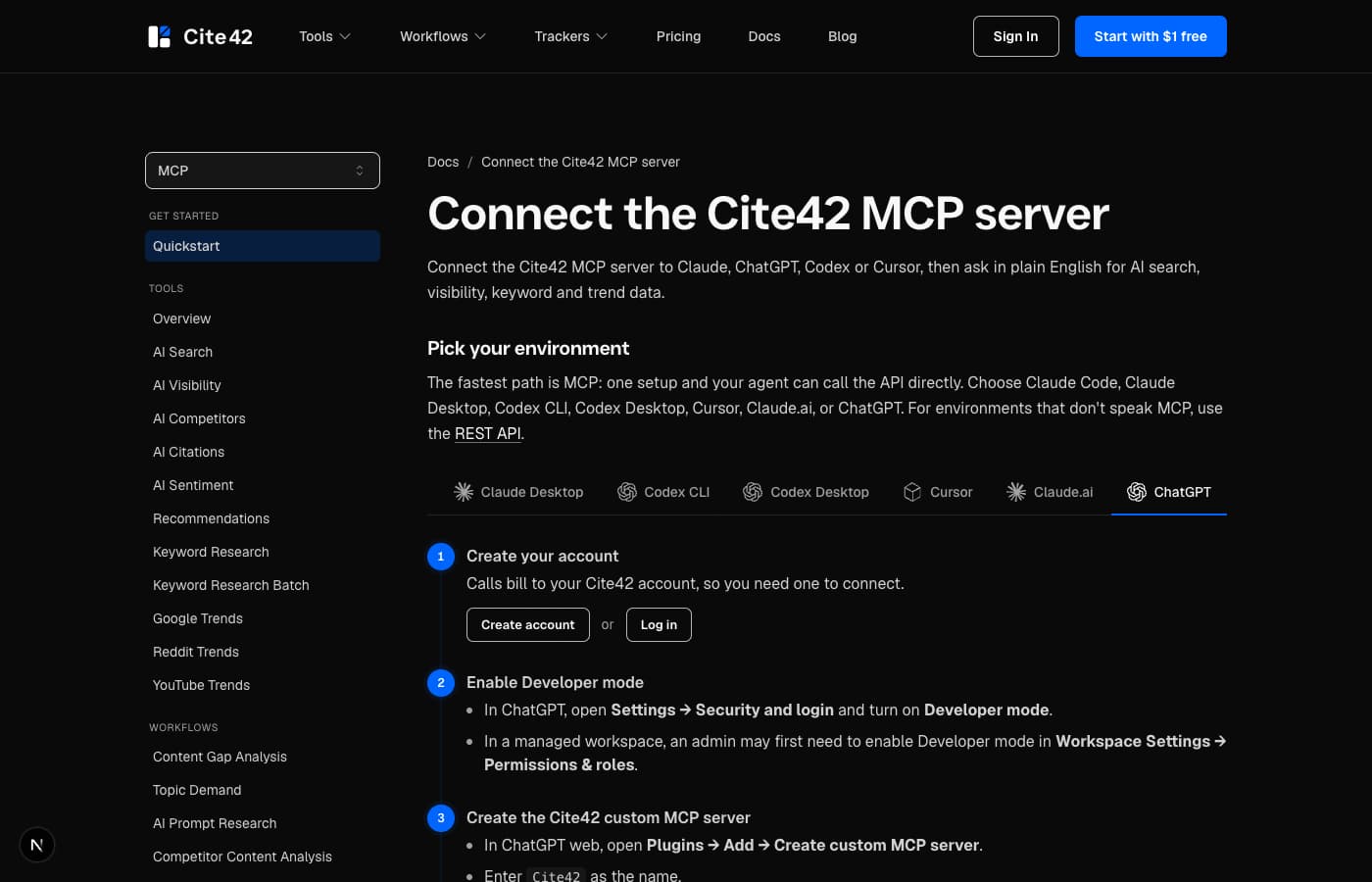
The Cite42 MCP documentation covers the server and account setup. If your ChatGPT account can't add custom MCP servers, the same tools work in Claude Code and Codex, which the Claude Code SEO guide walks through, or over the REST API.
Step 2: Ask for suggestions first, then measured data
Give ChatGPT the business, the reader and the decision you're making. In our example the business is Cite42, the readers are developers and people who use AI assistants for SEO research, and the decision is which tutorials and comparisons to write first. That context explains why small phrases such as "seo mcp" and "google trends mcp" matter more to us than a broad term like "ai visibility tools".
Then set an output rule before ChatGPT starts:
We are planning Cite42 articles for developers and AI assistant users.

Suggest a shortlist of keyword phrases first.
Then use Cite42 keyword data for the United States.

For each phrase, keep:
- the requested phrase
- returned keyword and status
- reported monthly search volume
- CPC and advertising competition
- country and retrieval date

Label ideas as suggestions until the tool returns measured fields.
Keep missing values as null or unavailable.
Never infer AI prompt volume from Google keyword volume.
This rule stops ChatGPT from turning a plausible phrase into a plausible-looking data row. Its wording and judgment are useful, and they stay visibly separate from the tool's numbers.
Step 3: Check your shortlist in one batch
Cite42's keyword batch checks 2 to 50 keywords for one country in a single call. Our real research checked 24 US keywords in one batch, billed $0.09. Six of the results:
- Reported US monthly searches
- 90
- Reported US monthly searches
- 90
- Reported US monthly searches
- 50
- Reported US monthly searches
- 10
- Reported US monthly searches
- 1,600
- Reported US monthly searches
- 1,600
The response gives monthly averages without naming the reporting month, so call them reported monthly estimates retrieved on October 5, and treat them as demand, rather than a forecast of your traffic.
In ChatGPT, ask for cite42_keywords_batch with your seeds and country, and check the tool response before accepting ChatGPT's summary of it. To run the same check over REST:
curl --fail-with-body https://www.cite42.dev/api/v1/keywords/batch \
  -H "Authorization: Bearer $CITE42_API_KEY" \
  -H "Content-Type: application/json" \
  -d '{
    "seeds": [
      "claude code seo",
      "seo mcp",
      "google trends mcp",
      "ai visibility api"
    ],
    "country": "us"
  }'
Step 4: Read CPC and competition correctly
Our "seo mcp" result returned a CPC of about $17.93 and advertising competition of 0.53, labeled medium. "ai visibility api" returned a volume of 10, low competition and no CPC value at all.
Both numbers describe paid search. Competition measures how strongly advertisers compete for the keyword, which is a different question from how hard it is to rank organically; for that, review the search results and the pages already ranking. A missing CPC means the click cost is unknown, which is different from $0. Google's historical keyword metrics documentation defines these fields for Keyword Planner data.
Ask ChatGPT to keep CPC out of revenue forecasts. A high CPC hints at commercial intent, and that's all: it says nothing about your conversion rate or margins. For Cite42, the useful reading was simple. "seo mcp" has measured demand and fits the product closely, so a specific comparison article was worth writing.
Step 5: Expand one seed into keyword ideas
The batch returns metrics for the keywords you supply. For related suggestions, use the single-keyword tool with ideas: true.
Our "keyword research api" request returned a seed volume of 90 and 50 ideas, including "semrush api" at 720, "semrush api pricing" at 170 and "keyword search volume api" at 30. It was billed $0.12. Branded ideas like "semrush api" can justify a comparison page, but they answer a different question from an unbranded developer search, so ask ChatGPT to explain why each idea belongs on the list:
Use Cite42 keywords for "keyword research api",
country "us", with ideas enabled.

Keep the original seed result separate from the ideas.
Group only relevant ideas by reader intent:
API comparison, pricing, implementation and data definitions.

Explain each exclusion. Report each idea's volume as its own.
The batch and ideas calls in this example were billed $0.21 together on the research date.
Step 6: Handle missing data, then choose pages
Long, specific phrases often have no measured volume. We checked "claude code keyword research with cite42" and got no_data, with null volume, CPC and competition, plus broader alternatives such as "ai coding assistant". Ask ChatGPT to report "no measured data returned for this phrase" and offer the alternatives as new candidates. An alternative's volume belongs to the alternative, and a missing result only means the data source has no figure for the phrase, which is different from zero searches. If a request fails, record an error rather than a zero.
Choose the country before comparing numbers. A US result says nothing about UK or worldwide demand, so run a separate request for each market your buyers search in and keep the country on every row.
Then pick pages by demand and product fit. For Cite42, the first articles covered Claude Code SEO, SEO MCP servers, Google Trends MCP and AI visibility APIs: small volumes, each matching a real product workflow. The bigger "google trends api" term (1,600 searches) earned its own developer guide rather than a reworded setup tutorial. Ask ChatGPT for a title, the reader's decision and the evidence each page needs, and reject briefs that only restate the keyword.
Search volume is one signal; AI answers are another. When we asked five AI tools "How can I use ChatGPT to do keyword research with real search volume data?" in October 2026, Semrush and Ahrefs were named in all four answers that completed. The AI visibility tracking guide shows how to measure prompts like that over time.
What keyword research in ChatGPT costs with Cite42
Cite42 charges per call with no subscription and no monthly fee. You top up a prepaid balance (minimum $25.00), the balance never expires, and you pay only for successful calls. A verified signup adds $1.00 of free credit, which covers the batch and ideas calls in this guide.
A batch of 2 to 50 keywords costs $0.09 when any keyword returns volume. A single keyword costs $0.09, or $0.12 with up to 50 related ideas. Your ChatGPT plan is billed separately by OpenAI. The same Cite42 account adds Google Trends and AI visibility checks, which you can call from the same chat.
Frequently asked questions
Can ChatGPT do keyword research with real search volume?
Yes, once you connect a keyword data tool as a custom MCP server. ChatGPT then calls the tool and reports measured volume, CPC and competition for the exact phrases and country you ask for. Without a connected tool, the volumes ChatGPT gives are estimates from its training data or from web pages it finds.
How do I connect a keyword tool to ChatGPT?
In ChatGPT on the web, go to Plugins, select the plus button and choose Add custom MCP server. Enter the server URL (for Cite42, https://mcp.cite42.dev), choose OAuth, confirm the risk warning, select Create as a plugin and install it. Then type @ in a new chat and pick the plugin.
Which keyword research tools work inside ChatGPT?
Cite42 connects through its hosted MCP server with OAuth and returns monthly search volume, CPC and competition per call. Keywords Everywhere runs an official MCP server that supports ChatGPT with OAuth and uses your Keywords Everywhere credits. Semrush and Ahrefs run MCP servers for their subscribers.
How much does keyword research in ChatGPT cost?
With Cite42 there is no subscription: a batch of up to 50 keywords costs $0.09, a keyword with ideas costs $0.12, and you top up from $25.00 with a balance that never expires. You also need a ChatGPT plan that can add custom MCP servers.
Try it on your own shortlist
Create a free Cite42 account for $1.00 of starter credit, connect it to ChatGPT with the steps above, and ask for volumes on 10 to 50 keywords you're deciding between. The keyword research tool page lists every field, the keyword research API comparison covers other data sources, and the content gap guide shows how to combine search demand with what AI answers already say.